
Healthcare Software Development: What to Know Before Building a Digital Health Product
Healthcare software development is the process of building digital tools, like patient portals, scheduling systems, and electronic health records, that support clinical care and health administration. It differs from regular business software because it has to work around strict privacy rules, connect with existing clinical systems, and serve very different types of users (patients, clinicians, and administrators) without slowing any of them down.
If you’re planning a digital health product, the biggest risk isn’t picking the wrong tech stack. It’s building something that looks great in a demo but doesn’t actually fit how clinics and hospitals work day to day. This guide walks through what to think about before development starts, from mapping the real workflow to choosing the right MVP, so you can avoid that trap.
What is healthcare software development?

Healthcare software development means designing, building, and maintaining the digital systems used to support patient care and the business of running a healthcare organization. That includes patient portals, electronic health record (EHR) systems, telemedicine platforms, scheduling tools, billing software, remote monitoring apps, and clinical decision support tools.
What sets it apart from ordinary app development is the environment it operates in. It usually needs to comply with data protection regulations, work alongside systems that already exist in a clinic or hospital, and support several types of users at once, each with different goals and very little patience for friction. A patient booking a check up wants something quick and simple. A nurse charting medications during a twelve hour shift needs something even faster. Healthcare software development sits right at the intersection of engineering, clinical workflow, data privacy, and interoperability standards like HL7 and FHIR.
Why healthcare software is different from ordinary business software

Most software is built to help someone complete a task a bit more easily. Healthcare software has that same goal, but with a few extra layers on top that you can’t skip.
Compliance isn’t optional. Depending on where you’re building, you may need to meet data protection laws and, if your product touches diagnosis or treatment in any way, medical device regulations too. This has to shape your data model and access controls from day one, not get added in later as a patch.
Mistakes have real consequences. A bug in a shopping cart costs you a sale. A bug in a dosage calculator or an appointment reminder system can put someone’s health at risk. That’s why testing, audit trails, and careful change management matter more here than in most other industries.
People expect it to connect with what they already use. Hospitals and clinics rarely adopt a new tool in isolation. A scheduling app needs to talk to the practice management system. A patient portal needs to pull data from the EHR. A product that can’t integrate tends to create more admin work than it saves, and staff will quietly stop using it.
Different users want different things, and they often conflict. A feature that saves a clinician time might create extra steps for an administrator reconciling billing codes later. Good healthcare software finds a balance instead of optimizing for just one group.
Understanding these differences early saves you from the most common and expensive mistake in this space: treating a healthcare build like a typical SaaS project, only to realize deep into development that the data model, security setup, or integration plan needs to be rebuilt from scratch.
Start with the healthcare workflow, not the feature list

It’s tempting to kick off a healthcare project with a feature list: booking, messaging, records, payments, done. But features without workflow context usually produce software that nobody actually wants to use.
A better place to start is mapping out the real process your software needs to support. Take something that sounds simple, like booking a specialist appointment. In reality, that might involve checking referral requirements, confirming insurance or medical aid coverage, matching availability across clinicians and locations, sending pre-visit forms, and running a reminder sequence. Each step touches a different system and a different person, and each one is a place where things can go wrong.
Mapping this out first tells you which features are actually essential, which can wait until later, and where your assumptions about “how healthcare works” might simply be wrong. It also shows you where automation genuinely helps and where a human still needs to make the final call for safety reasons. Once you understand the workflow, turning it into a feature list and a technical architecture becomes a much easier job.
The key users: patients, clinicians, administrators and managers

Healthcare software usually serves at least four different groups of people, and they don’t want the same things.
- Patients want things to be easy: booking appointments, understanding results, messaging their provider, and paying a bill, without needing to understand how any of it works behind the scenes.
- Clinicians care about speed and accuracy above almost everything else. Any feature that adds extra clicks during a busy clinic day will get pushback fast, no matter how polished it looked in the demo.
- Administrators, like front desk staff, schedulers, and billing teams, need tools that cut down repetitive manual work across systems that often don’t talk to each other well.
- Managers and executives are looking at the bigger picture: utilization, compliance, financial performance, and visibility across the whole organization rather than one patient at a time.
If you design with all four groups in mind from the start, even when your first release only serves one or two of them, you’re far less likely to build something that helps patients but creates extra work for clinicians (or the other way around). It’s also worth remembering that the person paying for the software often isn’t the person using it every day, which changes how you’ll need to think about getting buy in.
How to define an MVP for a healthcare product
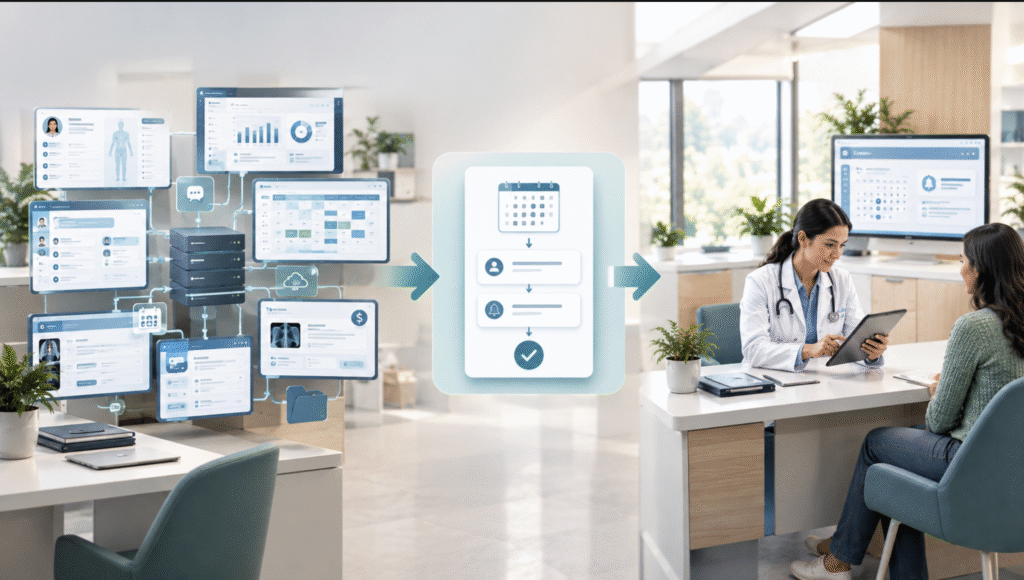
A good healthcare MVP does one thing really well inside a single, clearly understood workflow. It’s not a lightweight version of an entire hospital system.
A useful trick is to pick the narrowest slice of the workflow that delivers real value and can actually be tested by real people. Instead of building a full patient portal with records, messaging, billing, and scheduling all at once, an MVP might focus purely on appointment booking and reminders for one clinic or one service line. That keeps the build small enough to launch fast while still being tied to a genuine need, not a made up demo scenario.
A few things to keep in mind when scoping a healthcare MVP:
- Anchor it to a workflow, not a persona. “A patient app” is too broad. “Pre-visit intake for outpatient consultations” is something you can actually build and test.
- Decide early which compliance and security work can’t wait. Things like access controls and audit logging aren’t a “we’ll add that in v2” item, because retrofitting them once a system is live and handling patient data is far riskier than building them in from the start.
- Plan for at least one real integration, even at MVP stage, if the workflow depends on existing data like patient records or insurance details. An MVP that only runs on dummy data often can’t tell you whether you’ve actually solved the real problem.
- Test it with the people who’ll use it every day, not just investors or internal stakeholders. A handful of clinicians or admin staff using it for real will tell you more than any pitch meeting will.
Scoped this way, your MVP answers a real question, does this solve the workflow problem well enough that people will actually use it, instead of just proving that a set of screens can be built.
Common healthcare software components: portals, scheduling, records, messaging, payments and analytics
Most digital health software, no matter the specialty or the market, is built from a recurring set of pieces:
- Patient portals: self-service access to appointments, results, forms, and messages with providers.
- Scheduling systems: booking, calendar management, and reminders, often across multiple clinicians and locations.
- Records management: structured storage of patient history, clinical notes, lab results, and treatment plans, usually needing to work alongside an existing EHR.
- Messaging and communication: secure messaging between patients and providers, or across a care team, built with privacy requirements that consumer chat apps simply don’t have.
- Payments and billing: processing payments, handling insurance or medical aid claims, and reconciling billing codes.
- Analytics and reporting: dashboards covering utilization, outcomes, financial performance, and compliance for the people managing the organization.
Very few products need all of these on day one. Which ones matter depends entirely on the workflow you’re solving for. A telehealth startup might prioritize scheduling, messaging, and payments first. A hospital operations tool might lean into records and analytics instead. Choosing components based on your workflow mapping, rather than building everything “just in case,” keeps the product focused and a lot easier to secure and maintain later.
Why integrations matter before development begins

Healthcare software almost never operates alone. A new product usually needs to exchange data with systems already in place at a clinic or hospital: EHRs, practice management software, lab systems, insurance or medical aid platforms, and payment processors.
Planning these integrations before you start building, rather than after, matters for a few reasons. First, the quality and availability of an organization’s existing systems often determines what’s actually possible. A beautifully designed feature means nothing if the data it needs can’t be reliably accessed. Second, interoperability standards like HL7 and FHIR exist specifically to make clinical data exchange safer and more consistent, and designing your data model around them from the start is a lot easier than retrofitting it later. Third, in many regions, the sheer number of separate payer and provider systems adds real complexity to any integration plan.
South Africa is a good example of this. The country runs a two tier healthcare system, and roughly 85% of the population relies on an overstretched and underfunded public system, while the private sector is served by a fragmented mix of hospital groups and dozens of separate medical aid schemes, each running its own claims and administration systems. South Africa’s National Health Insurance Act was signed into law in May 2024, though its rollout is still facing delays. For a healthcare software development project, this fragmentation means a scheduling or payments feature that looks simple on paper might need to account for several different medical aid integrations, inconsistent data formats, and a public private divide with very different levels of digital infrastructure. Mapping that landscape early on saves you from costly surprises halfway through the build.
Security, privacy and role-based access

Healthcare data is about as sensitive as personal information gets, and protecting it needs to be part of the architecture from the beginning, not a checklist you tick off right before launch.
A few things are foundational to any digital health software project:
- Role-based access control, so what someone can see and do lines up exactly with their role. A receptionist shouldn’t see clinical notes, and a clinician in one department shouldn’t necessarily see records from another.
- Encryption of data at rest and in transit, applied consistently everywhere, including backups and any third party integrations.
- Audit logging, so every access to patient data can be traced: who viewed it, and when.
- Data minimization, collecting and keeping only what the workflow genuinely needs, which cuts down both risk and compliance overhead.
- Clear consent and data sharing policies, especially for products connecting with multiple providers or third parties, so patients actually understand where their data goes.
These aren’t just legal boxes to check. They’re also what builds trust with clinicians and patients, who tend to be (understandably) cautious about handing over health information to a new digital tool.
How to validate a healthcare software idea before building the full product

Before you commit to a full build, it’s worth figuring out whether the workflow problem is real and whether your proposed solution actually fits how people work.
A few validation approaches tend to work particularly well in healthcare:
- Shadow the current workflow. Spend time watching how the task gets done today, whether that’s on paper or in some disconnected system, before assuming software is the answer or deciding how it should work.
- Test a low fidelity prototype with real clinicians or admin staff, not just prospective buyers, so you can see exactly where the workflow breaks down in practice.
- Pilot with one clinic or department, not an organization wide rollout, so problems show up early and cheaply.
- Track actual adoption, not just enthusiasm. Good feedback in a demo doesn’t guarantee people will use it daily. Usage data from a small pilot tells you far more than a room full of nodding heads.
- Check integration feasibility early, even informally, by talking to IT teams about what data access is actually possible. This alone can validate, or completely rule out, a product direction.
Validating this way before you scale up development cuts the risk of building something technically solid that just doesn’t fit how care actually gets delivered.
Build for the workflow, then scale the technology

Healthcare software development succeeds or fails less on technical polish and more on whether it actually fits the workflows, the users, and the regulatory environment it’s built for. Start with the workflow instead of the feature list. Scope your MVP around one process you genuinely understand. Plan your integrations early. Treat security and privacy as part of the foundation, not an extra.
Get that right, a workflow that works, users who actually adopt it, data that’s protected, and systems that talk to each other, and scaling the technology becomes a far more manageable problem than trying to bolt it all on after the fact.
Frequently asked questions
What is the difference between healthcare software development and regular app development?
Healthcare software has to meet data privacy regulations, integrate with existing clinical systems like EHRs, and serve multiple user types (patients, clinicians, administrators) with very different needs. Regular business software rarely carries all three of those constraints at once.
What should a healthcare MVP include?
A healthcare MVP should cover one clearly defined workflow (like appointment booking for one clinic) rather than a lightweight version of a full platform. It should also include core security requirements, like role based access and audit logging, from the start.
Why do healthcare integrations matter so much?
Because healthcare organizations already run on multiple systems (EHRs, billing platforms, insurance systems), and new software that can’t connect to them usually creates more manual work rather than less, which slows or kills adoption.
Is healthcare software development different in South Africa?
Yes. South Africa’s two tier public and private healthcare system, along with its fragmented medical aid landscape, means integration planning needs to account for multiple payer systems and very different levels of digital infrastructure between the public and private sectors.